
License details
Commercial
2.x Compatiabilty
62113
Advance FAQ Module (1.5.x , 2.x , 3.x & 4.x )
(9 reviews)
- $29.99 $28.49
Sold by an Official OpenCart Gold Partner
Free updates for 6 months, valid for one license only
Secure checkout, instant delivery
Facing an issue?
Raise a ticket
Demo Videos
See the extension in action before you buy — the live storefront, the admin panel and the complete video walkthrough.
Live Storefront Demo
Browse a real OpenCart store running this extension.
Admin Panel Demo
Explore the extension settings from the admin panel.
TMD is an Offical Partner of OpenCart
View Profile: TMD OpenCart Extensions India
TMD Advance OpenCart FAQ Module
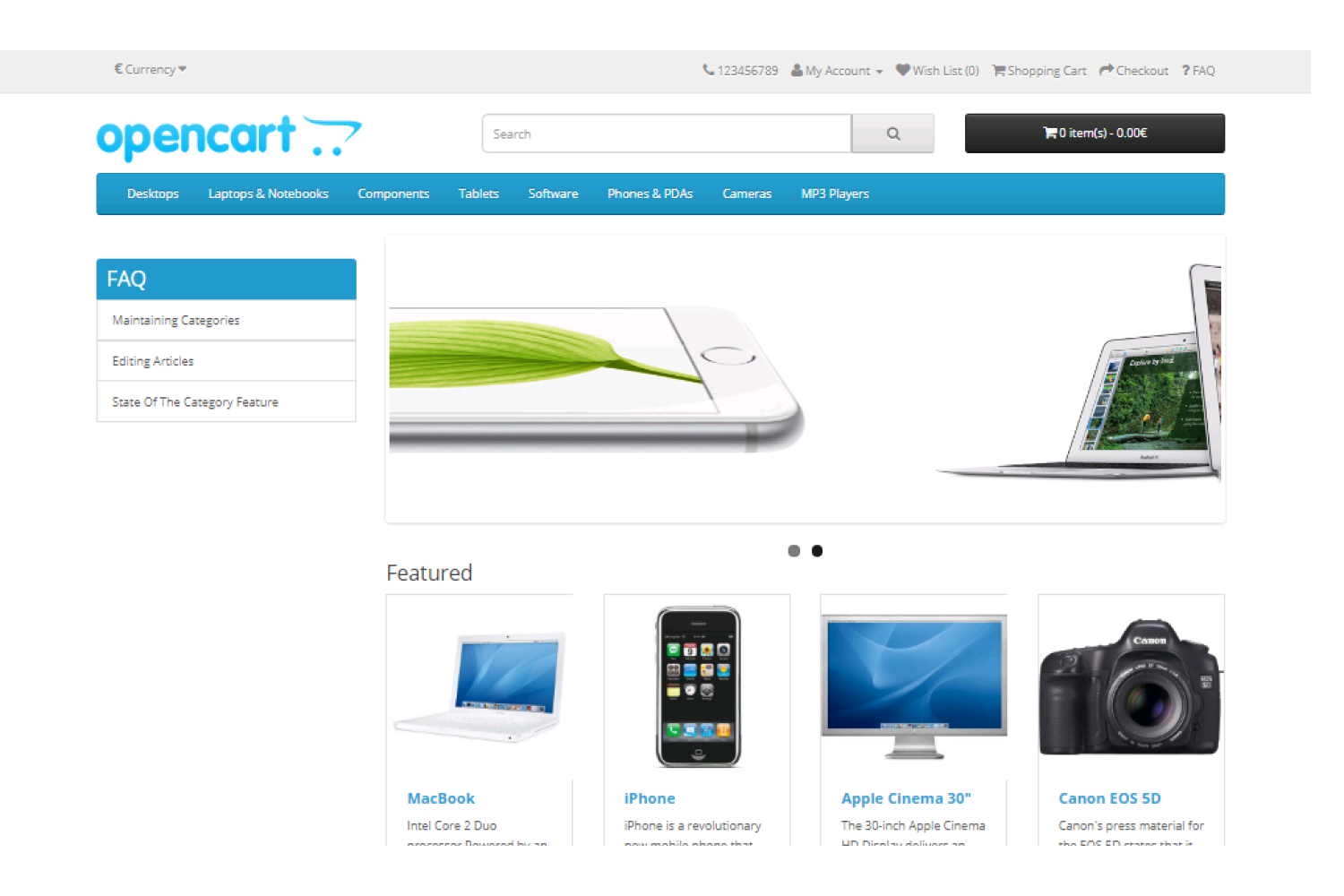
This module allows the admin to display frequently asked questions and answers on the website. FAQ can also be listed with categorizing which makes it more effective to read and saves customers or visitors time. It creates automatically a Faq page on the OpenCart website.
Admin can write as many FAQs as a website wants to tell their visitors. It helps them to get answers in an easy way.
Explaining answers with images and video gives more understanding to your visitor. Thus OpenCart faq page provides a solution to their questions. It creates FAQ Page on your website where the visitor can read answers to their questions.

Features of OpenCart FAQ Extension
FAQ extension for OpenCart helps to create categories for Faq. Admin can write question and answer and select categories. The FAQ page will show questions listed with categories.
This extension is perfect for anyone looking for an FAQ page on their site. It works flawlessly on the FAQ page because it uses javascript. Admin can assign multiple FAQs in one category. This will make these FAQs display under the same category on the FAQ page.
A filter is present in admin to search faq questions. Searching can be made using the question name or category or by the status of the question. There is a search bar for visitors to search their questions on the faq section. The result will be filtered from the FAQ and display on the same page.
Using our module website can decrease the help time of the support team. The support team can give their time to another important task.
- Search for visitor
- Create Categories
- Write multiple FAQs
- Filter available for admin.
- Write answers with images or videos.
- Show one question in multiple categories
- Accordion-style FAQs
- Google Rich Snippet
- Attach FAQ Category to Products
Added Search Engine Rich Snippet
OpenCart FAQ module is now able to show your faq answers in search Engines as rich snippets. It will drive more genuine traffic to your website.
This extension is SEO-friendly. Admin can set user-friendly url of faq category.
Attach FAQ Category to Products
OpenCart faq extension has a feature to show faqs on the product page. Admin can enter answers to the frequently asked question by the customer into FAQs and create a category.
Then this category will be added to the product page. While creating or editing the category, Admin can select products to display. These features can reduce Website customers' support timing and help to grow business.
All the faqs present under the category will be displayed on selected products. The product page will have a section called FAQ, where all the questions and answers will display.

Display FAQ On Product Page In New TAB Or Below Description
Now Admin can display FAQ on the products page in a new TAB. FAQ Tab will be displayed after the description tab. By clicking the FAQ tab, the selected faq category faq list will display.
OpenCart FAQ extension also now makes it easy to display FAQs below the description. Just select where the admin wants to display FAQ on the product page from the setting. And all set.
- Display FAQ on the product page as a new tab
- Show FAQ below the description on the product page
Admin Configuration
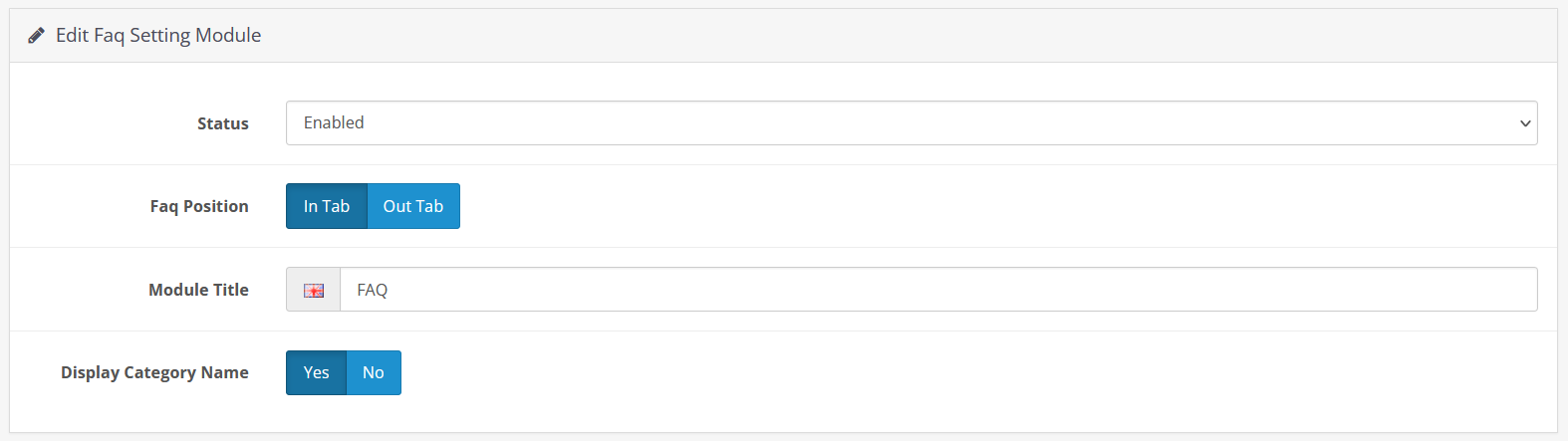
OpenCart faq extension will be ready to use within 2 minutes. Just install and the admin is ready to display faq on their website.
It is fairly easy to create a faq page on the website. The first FAQ categories will be created by the admin. There is a WYSIWYG editor present for writing the FAQ. It allows the writer to add images and videos along with the text. Adding multimedia content makes a more understandable answer.
Selecting multiple categories while creating an FAQ will assign that particular FAQ to that category and display it under assigned categories.
Enable or disable FAQ with a single click. If the admin wants to hide the faq page from the website then, the admin just needs to disable the FAQ module on the website. It will hide the FAQ page from the entire website. Also, remove the FAQ URL from the sitemap.

Support All OpenCart Theme
FAQ extension OpenCart uses VQMOD and OCMOD. It is accessible for all OpenCart themes. The extension works perfectly with all themes available in the market. TMD has done testing with highly-sold OpenCart themes as well as well-known themes. Extensions are plug-and-play.
It is tested with many famous themes. Journal, Shoppica, Fastor, Sellya are some names of the themes. Custom themes require some additional work.
Supports OpenCart 1.5.x, 2.x and 3.x Versions
TMD used OCMOD and VQMOD to create the OpenCart faq module. It works perfectly on 2.0.x and 3.0.x versions of OpenCart. It is also tested up to the latest stable version 3.0.3.3.
For those who still using an older version of OpenCart, TMD maintains a 1.5.x version of this extension. Just because of their comfort. We value all websites and their businesses.
It is tested on the cloud version to give the best performance. Testing has been done using the Unit test to give quality to work.
There will no core file will alter after installation of the FAQ extension for OpenCart into your website. It uses OCMOD and VQMOD. It virtually creates a file system and adds compatibility to files on runtime.
Your website files will remain the same and untouched after the installation of TMD OpenCart modules. The website will continue to function as before it does. It is easy to use right? Yeah!
Support
Got pre-sale questions or have questions about support? Please create a ticket. We will help you to get it working.
Full Documentation
Compatiabilty
| Supported OC Versions | 1.5.6.4 , 1.5.6.3 , 1.5.6.1 , 1.5.6 , 1.5.5.1 , 1.5.4.1 , 1.5.4 , 1.5.3.1 , 1.5.3 , 1.5.2.1 , 1.5.2 , 1.5.1.3 , 1.5.1.2 , 1.5.1.1 , 1.5.1 , 1.5.0.5 , 1.5.0.4 , 1.5.0.3 , 1.5.0.2 , 1.5.0.1 2.1.0.2 , 2.1.0.1 , 2.0.3.1 , 2.0.2.0 , 2.0.1.1 , 2.0.1.0 2.2.0.0 2.3.0.2 , 2.3.0.1 , 2.3.0.0 3.0.3.8 , 3.0.3.7 , 3.0.3.6 , 3.0.3.2 , 3.0.3.1 , 3.0.3.0 , 3.0.2.0 , 3.0.1.2 , 3.0.1.1 , 3.0.0.0 , 3.0.3.9 4.0.2.3 , 4.0.2.2 , 4.0.2.1 , 4.0.2.0 , 4.0.1.1 , 4.0.1.0 , 4.0.0.0 , 4.1.0.0 , 4.1.0.1 , 4.1.0.2 , 4.1.0.3 |
| VQMOD Required | YES |
| MultiStore Support | No |
| Support | yes |
| Update | yes |
Related Products



Modules
Multicolor Stock label (1.5.x , 2.x & 3.x ,4.x)
.tab-description-new..
(3)
2.x
$20.00
$19.00


Modules
GDPR - General Data Protection Regulation
TMD is an Offical Pa..
(2)
2.x.x,3.x.x
$29.99
$28.49