

License details
Yes
Multivendor Purchase Order
- $99.00 $94.05
Demo Videos
See the extension in action before you buy — the live storefront, the admin panel and the complete video walkthrough.
Live Storefront Demo
Browse a real OpenCart store running this extension.
Admin Panel Demo
Explore the extension settings from the admin panel.
TMD is an Offical Partner of OpenCart
View Profile: TMD OpenCart India
Overview Of TMD OpenCart Multi Vendor Purchased Order Extension
It allows you to easily coordinate your purchase orders with your supplier directly from your administration panel. Skip the hassle of manually submitting your purchase orders to your supplier.
This system is essential for an OpenCart eCommerce store that has multiple suppliers and manages large or small inventory.
This extension simplifies the purchase order creation and management process in a logical and methodical fashion that makes the process more effective and reduces the communication gap.
The most useful feature of this extension is the one-click Purchased Order generation. It makes supplier order management easier for the website owner and also lets you create purchase orders manually by picking suppliers and their products yourself.
Purchased Order For Supplier Directly From OpenCart Admin
This extension lets the supplier connect with to TMD multivendor module. It has many inbuilt features that help the website owner to send purchased orders to suppliers and set status and other things.
Admin can set payment status, link with their products(existing), and create a purchased order for them. It also lets the admin set payment terms for individual suppliers.OpenCart multivendor purchased order extension helps suppliers list account information, latter it can use to make payments for supplied products to your site.
Here is a complete feature list of purchased order extensions.
- Supplier list.
- Link Supplier to Products.
- Create Purchase Order.
- Set Payment Status.
- Set Payment method.
- Set Account Information.
- Payment Term.
- Works with TMD multivendor.
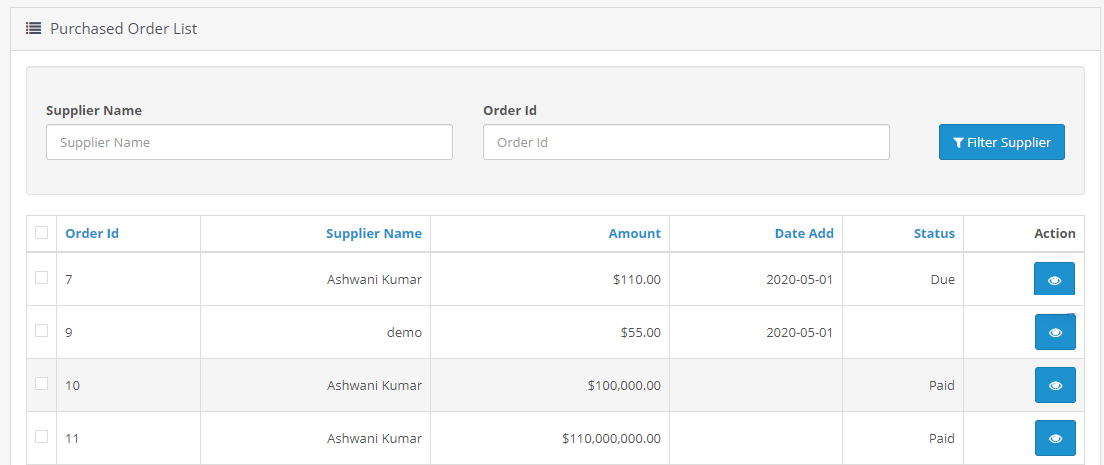
Add Suppliers And Account information
This extension has the option to add unlimited suppliers. Admin can save supplier name, company name, email address, phone no. website, GST number, and address. This supplier information will be used to link their products.
It is easy to link the products and their options to existing suppliers in the admin. Admin enters the cost of the product and its option separately. Select the supplier from the dropdown. Here are steps to add suppliers and link products
Create A New/Edit Supplier
- Go to Vendor Menu → Select Purchase Order
- Click on supplier → Add a new Supplier
- Enter the supplier information → save.
Link Supplier To Their Products
- Click on Supplier To Link Product → Add New Product
- Here admin can select the supplier by searching by their name.
- The vendor automatically applied.
- Select the product by searching by name.
- Enter the cost of the product.
- If the option is available for the product. Admin can enter the cost of the option.

Create Purchase Order, Update Payment Status, Send To Supplier, And More
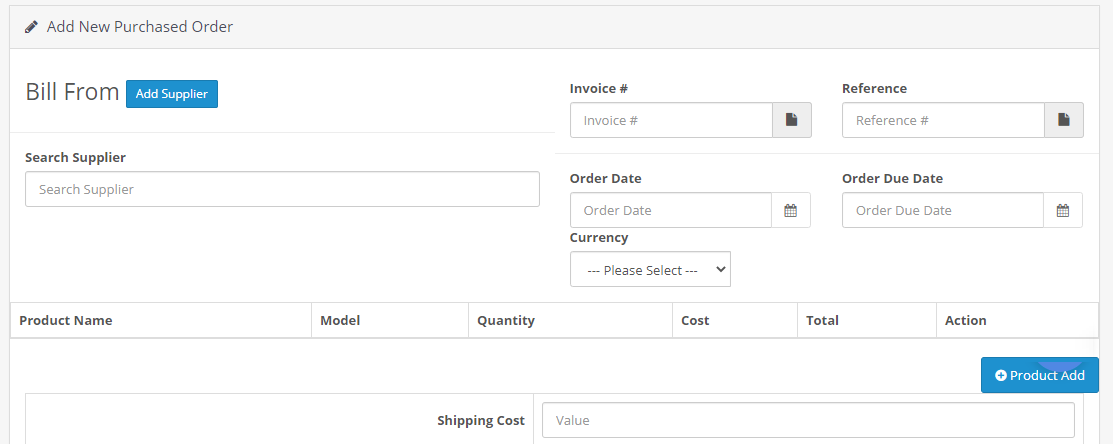
This extension has advanced the purchasing order process.OpenCart purchased orders for the multivendor module consist of essential fields like supplier name, invoice no, reference no, order date, payment due date, selection of products, and other things.
Admin can preview previously generated purchased orders having all the information and check, and change the status of payment at any time. Also, Admin can send the purchased order invoice to the supplier, and make the payment manually.
Multivendor purchased order for OpenCart extension lets you download the invoice in PDF and select the print option to print on paper.
Create Purchase Order
- Click on the purchased order menu.
- Select the supplier name, and enter the invoice no, and reference number.
- Order date, payment due date, select the currency.
- Select the products, and select the payment term.
View Purchase Order And More
- View it by clicking on the eye icon.
- Admin can manually mark the payment status complete.
- Send the purchased order to the supplier email.
- Print or PDF download.
- Change the payment status.
- Edit the purchased order.
Add Payment Information, Terms, And Account Information
This extension is a complete package of the supplier's purchased order. OpenCart admin gets the option to add payment information that the supplier accepts.
Admin can set the payment status of the supplier and set the stock YES/NO. Enter the payment method for the supplier they select and the payment terms.
Admin can save the bank account and other payment information from the supplier.


Supports OpenCart 2.x and 3.x versions
TMD made this module work on OpenCart versions 2.x and 3.x versions. OpenCart purchased an order for the multivendor module can be easily installed via the upload module section in admin, on your website. Because This module uses OCMOD. Which does not overwrite core files. It also works with cloud-based online websites.
Our all modules, extension, and themes are plug and play. Just install and you are ready to use them right away.
Addon Modules List
- Multivendor Membership/Subscription ADDON
- Multivendor Multi Seller/supplier Marketplace
- Multivendor OTP Verification ADDON
- Multivendor Pos Addon
- Multivendor RMA Addon
- Multivendor Register Custom filed Addon
- Vendor & Admin Order Notification - Multivendor Addon
- Vendor And Customer Communication - Multivendor Addon
- Add Dropshipping on Multi vendor Website
- Write product options SKU and UPC Codes in Multivendor
Support
Check out our demo or write to us with any query you just have in your mind. Got pre-sale questions or have questions about support. Please create a ticket. We will help you to get it working.
Compatiabilty
| Supported OC Versions | 3.0.3.8 , 3.0.3.7 , 3.0.3.6 , 3.0.3.2 , 3.0.3.1 , 3.0.3.0 , 3.0.2.0 , 3.0.1.2 , 3.0.1.1 , 3.0.0.0 2.3.0.2 , 2.3.0.1 , 2.3.0.0 4.0.1.0 , 4.0.2.0 , 4.0.2.1 , 4.0.2.2 , 4.0.2.3 4.1.0.0 , 4.1.0.1 , 4.1.0.2 , 4.1.0.3 |
| VQMOD Required | No |
| MultiStore Support | No |
| Support | yes |
| Update | yes |