License details
NO -DATA
NO -DATA Compatiabilty
18363
OpenCart PDF Invoice Template PRO
(3 reviews)
- $20.00 $19.00
Sold by an Official OpenCart Gold Partner
Free updates for 6 months, valid for one license only
Secure checkout, instant delivery
Facing an issue?
Raise a ticket
Demo Videos
See the extension in action before you buy — the live storefront, the admin panel and the complete video walkthrough.
Live Storefront Demo
Browse a real OpenCart store running this extension.
Admin Panel Demo
Explore the extension settings from the admin panel.
TMD is an Offical Partner of OpenCart
View Profile: TMD OpenCart Extensions India
Overview of TMD OpenCart PDF Invoice Template
You can use this extension to design an order invoice template that will send to the customer and admin's email as a PDF attachment when an order is confirmed. You can add or remove the fields from the invoice.
This module comes with lots of setting that lets you adjust the color theme of the PDF invoice to match your brand, add the logo, watermark, and product information, generate a QR and Bar code based on products, layout setting, paper size selection, etc.
Also, you can add new fields on the invoice at the top or bottom. You can write promotional messages, customer service helpline numbers, and upcoming items/services on the footer of the invoice. It will help you to improve customer service.
Our extension Works with the latest version of OpenCart and multi-language websites.
Decide On Which Order Status Invoice Will Generate
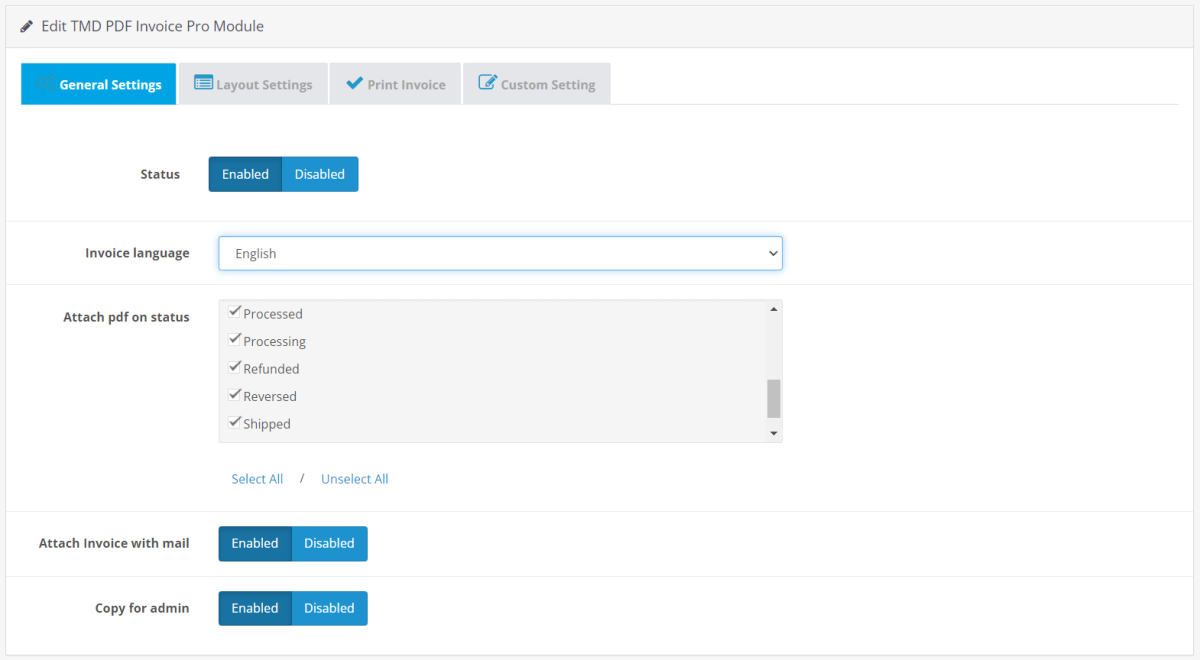
This OpenCart custom invoice extension has given the setting to generate the invoice to specified order status only. The module will automatically pull all the order statuses from the website setting, you can select the order statuses to which you want to automatically generate the invoice.
When a customer places the order and their order status matches with your selected order status in the setting, this extension will create a PDF invoice according to your setting. While naming the invoice file, this module will take the prefix value entered by the admin.
For example, if you enter the name prefix value "Mybrand_". The invoice file name will start with "Mybrand_invoice_101.pdf".
- → Select order status to generate the invoice
- → Enter invoice file name prefix value

Edit The Invoice Template In OpenCart
This module will help you edit invoice templates in OpenCart. Just enable the logo option to embed the logo on top of the invoice. Your website logo will be used. Admin can specify the product image width and height in pixels.
Admin can show or hide product name, image, model, quantity, price, order total, and from the invoice anytime. Also, show an additional custom field of the product on the invoice. A QR code or barcode can be created based on product id, model, UPC, EAN.
Apply the color theme on the invoice to match your website, add a watermark image on the invoice and in the footer, space given for writing the footnote for customers.
According to the printing machine, select your custom invoice template paper size. there are 4 types of printing paper sizes are given that will work for all countries.
- → Default the invoice language
- → The order status for invoice generation.
- → show or hide the product information
- → Product image height and width.
- → Change color theme of the invoice
- → Add custom fields or information
- → Image watermark
- → Logo on the invoice
- → Unique prefix name of the invoice file
- → Paper type. A4, A5, A5, letter, letter, legal.
- → Write the text for the footer note

Send Order invoice To Customer and Admin's Email
Let this extension send a PDF invoice to the customer's email id once the order is completed. Customers can download the invoice file on their device and check it later.
You can send a copy of the customer's order invoice to the admin email too. Every time when order is placed on the website, both customer and admin will get the order invoice. It will keep the admin updated about the website order.
Generate the Barcode or QR code Of the Product on the Invoice Template
Let your customer scan the QR code to land on your product page directly from the order invoice. OpenCart invoice edit setting will create the QR code for all the products present in the customer's order. You can create the QR code based on these 4 options.
- → Product Id
- → Product Model
- → UPC
- → EAN
Space for Writing Footer Notes on OpenCart Invoice
You can write the title and description. The module has a dedicated footer area where your writer's title and description will be shown. Also, the admin can write footnotes in the multi-language.
Adding Custom Information On Invoice
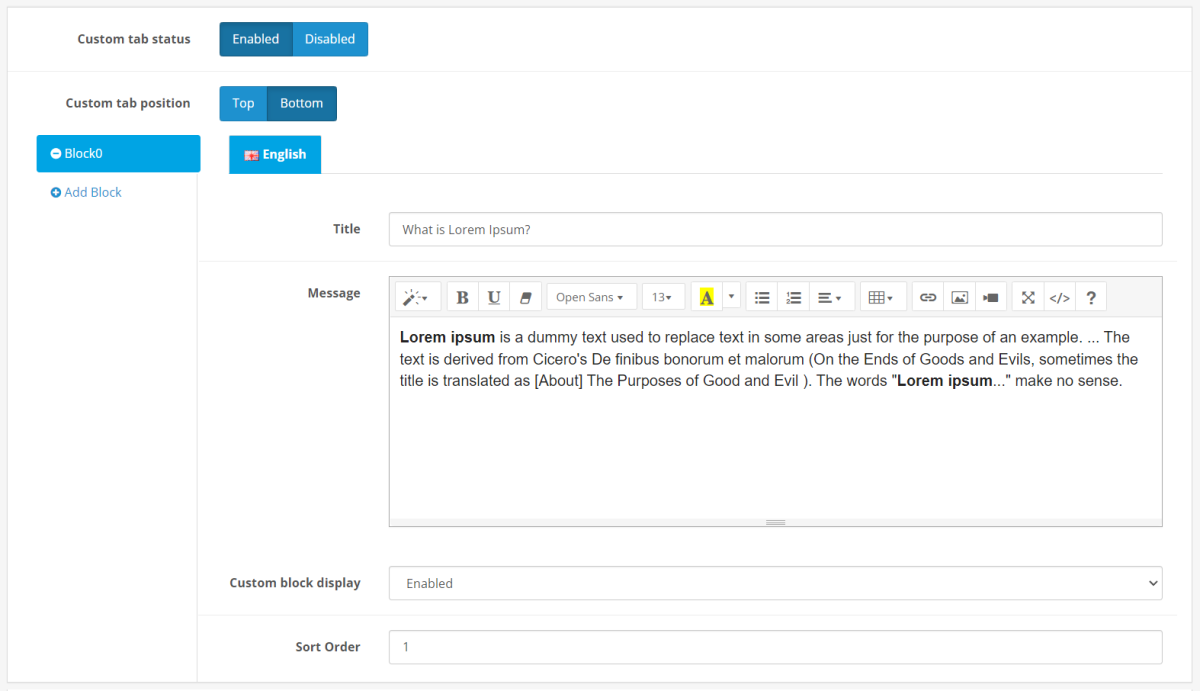
You can add extra fields on the invoice top and footer section. You can add multiple sections. Each section has its own title and description, status, and sort. You can write information in multi-language.
Go to PDF Invoice setting → Custom Setting → Select position either top or bottom, add block → enter the title and description, and enable the status. To other fields/blocks just press the add block.
Update the Color Theme of the Custom Invoice Template in OpenCart
You can change the color theme of invoice elements to make sure it matches the brand and website color them. A Javascript color picker is present to help you to select the color for different elements.
- → Title
- → Table border
- → Product information
- → Table Heading section background

Add Watermark on the Invoice
To make the invoice more authorized, you can set a background image. It will be a watermark image. It will prevent fraud and unauthorized use of invoices.
Go to PDF invoice setting → In the layout tab, select the watermark image → Hit the save button. Your selected image will be displayed on the invoice background as a watermark.
Compatible with Multi-language
Our module will still work perfectly on multi-lingual websites. Our module creates different-different tabs having country flags and langauge names for better visibility. For each language, you can write the footer note, custom fields and other information according to langauge tabs.
Supports OpenCart versions
All the modules are developed by following the standard OpenCart documentation. It uses the OCMOD. This makes it compatible with 2x, 3x, and 4x versions of OpenCart. The module works with the latest version of OpenCart.
Support
If you have any kind of pre-sale questions or want to get support. Just create a ticket, and our team will help you out.
Tags:
Full Documentation
Compatiabilty
| Supported OC Versions | 2.3.0.2 , 2.3.0.1 , 2.3.0.0 3.0.3.7 , 3.0.3.6 , 3.0.3.2 , 3.0.3.1 , 3.0.3.0 , 3.0.2.0 , 3.0.1.2 , 3.0.1.1 , 3.0.0.0 3.0.3.9 , 3.0.3.8 , 3.0.4.0 4.0.2.3 , 4.0.2.2 , 4.0.2.1 , 4.0.2.0 , 4.0.1.1 , 4.0.1.0 , 4.1.0.0 , 4.1.0.1 , 4.1.0.2 , 4.1.0.3 |
| VQMOD Required | No |
| MultiStore Support | No |
| Support | yes |
| Update | yes |
Related Products