License details
Single Domain
2.x.x,3.x.x Compatiabilty
44385
Subcategory Image Module (2.x , 3.x & 4.x)
(14 reviews)
- $20.00 $19.00
Sold by an Official OpenCart Gold Partner
Free updates for 6 months, valid for one license only
Secure checkout, instant delivery
Facing an issue?
Raise a ticket
Demo Videos
See the extension in action before you buy — the live storefront, the admin panel and the complete video walkthrough.
Live Storefront Demo
Browse a real OpenCart store running this extension.
Admin Panel Demo
Explore the extension settings from the admin panel.
TMD is an Official Partner of OpenCart
View Profile: TMD OpenCart Extensions India
Overview Of TMD OpenCart SubCategory Image Module
This module will let the admin display the image of the subcategories on the parent category page with an exquisite look and feel. Decide title and image
It has a new image option that can use to display images on subcategories. Show the sub-category in the grid or list view. Image height and width can change from the setting.
Admin can show all the subcategories in the carousel slider with pagination, autoplay, navigational icon, etc. Adjust the color theme of the subcategory appearance on the category page.
Using the OpenCart subcategory image extension, the admin can set the limit of the character of the description displayed on the category page. There are two layouts given in the module.
It supports the multi-language and is compatible with the 3x version of OpenCart
Setting For SubCategory Image
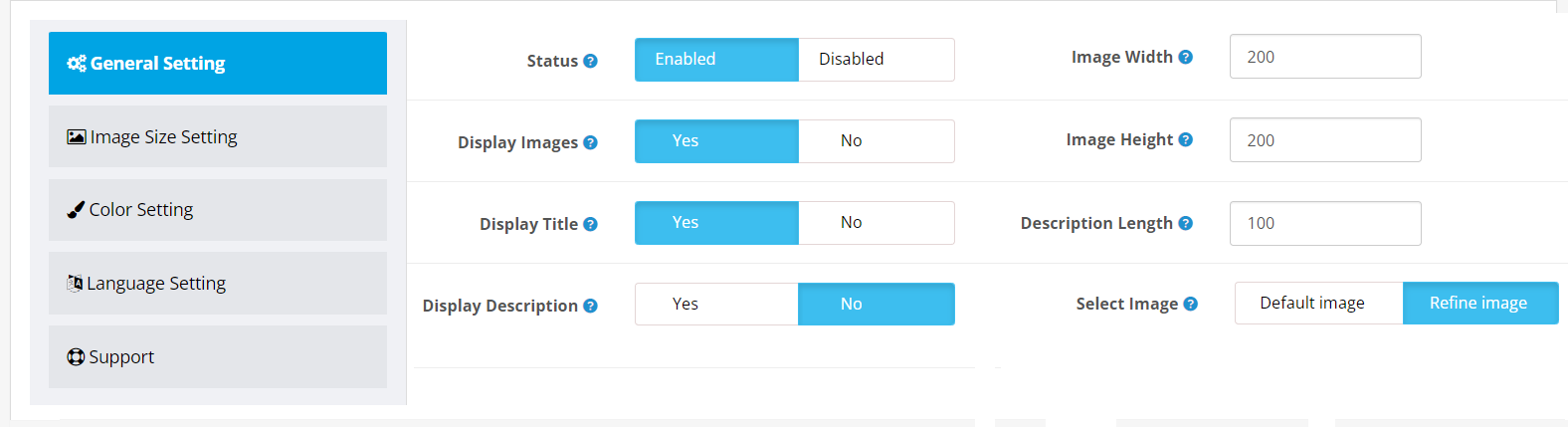
This extension has given a new image option called "Refine" on the category edit page in the administration section. Admin can display either the default image or refined image from the setting.
Set the size height and width of the image, and show/hide the title, description, and image. All these settings can be used to give the best user experience to your customers.
Moreover, There is an option to set the description character count limit. Category description text length will be exactly as mentioned in the setting.
This OpenCart subcategory image extension has a status setting that can be disabled to get the default theme's sub-category page back. And set the status to enable when the admin requires to get the module's subcategory information again on the sub-category page.
- Status
- Display images
- Display title
- Display description
- Image height and width
- Description text length
- Select Image: default or refine image
Select Layout For SubCategory Image In OpenCart
The OpenCart subcategory image module comes with 2 different layouts. Both the designs are responsive and retina ready. Elements look perfect on a mobile, tablet, desktop, mac, and other screens. This website can use choose one layout according to its website design.
Admin can select the layout. First is the list and gird view. The second is the carousel slider. The gride and list view will fit into the screen perfectly.
Admin can enable the pagination in the carousel slider to make show all the sub-categories perfectly, display navigational options, set the number of subcategories shown in a single slide, etc. It gives the flexibility to display what is good for the user experience.

Manage Color Theme In OpenCart SubCategory Image Extension
It is essential to make the website color theme consistent across all the pages of the website. That's why this module has given the color setting.
Admin can change the background, background hover color, border, sub-category title, sub-heading, etc. It will make sure subcategories will match existing your website's color theme.
The color applies to all the elements instantly. A JavaScript color picker is used which is supportable by all browsers.
- Background, and its hover color
- Border
- Sub Heading Color
- Title Color
- Description Color
- View All Text and button bg Color

Compatible With All OpenCart Themes
All the modules and extensions are created by following OpenCart documentation and guidelines. Therefore, the OpenCart subcategory image module is compatible with all the themes available in the market.
Some names themes are Journal, Shoppica, Faster, and Sellya. All the settings are applied at run time and are added to the sub-category page using an XML file.
If you created a theme according to your requirement. Our module will still support your website.
Multi-langauge Compatible
OpenCart subcategory image extension supports multi-language. All the language installed on the website and actions will show up in the sections containing the country flag and language name.
Admin can write the sub-category heading and view all button text in the respected language input fields. When customers change the language on the website, the module will detect the language and show the selected language data entered by the admin.
This will help a website to attract international customers and hence improve the sales graph.
OpenCart 2x and 3x Version Supports
OpenCart subcategory image extension is working on OpenCart 2.x , 3.x & 4.x versions. This module is tested up to the latest version 3.0.3.8. A unit test is performed to make sure the module meets the functionality.
OCMOD recommended by OpenCart is used in this extension. That means no core files of OpenCart will change or replace after the installation of the extension on your website. Subcategory information will automatically be added to the category page of the website.
The installation of the extension is easy. Upload a zip file of the module in the admin's extension installer. Do the modification refresh. And the module is ready to use.
How Does This Module Benefit Admin
- It improves customer relations and builds customer loyalty
- Creates an advanced customer support management system
- Admin can set color and design as per store theme
- Also, there are several more options and custom arrangements such as
- Enable/Disable the status of the Image
- Change the title of the product category
- Image size customization
- Text color customization
- Other customization features
Support
Free installation is available after purchase. If you have any suggestions or pre-sale questions, looking for support? Please create a ticket. Our team will reach you as soon as possible.
Tags:
- 2.0
- category image
- sub cat images
- sub cat image
- cat images
- cat image
- refine search images
- refine search image
- refine images
- refine image
- child category images
- multiple category images
- multiple category image
- different sub category image
- different sub category images
- diff sub cat image
- diff sub cat images
- child category image
- child cat images
- child cat image
- images under refine search
- images under refine
- subcategory images
- subcategory image
- subcat images
- subcat image
- multi cat images
- multi cat image
- multi category images
- multi category image
- sub category images
- sub category image
- category images.
Compatiabilty
| Supported OC Versions | 2.1.0.2 , 2.1.0.1 , 2.0.3.1 , 2.0.2.0 , 2.0.1.1 , 2.0.1.0 2.3.0.2 , 2.3.0.1 , 2.3.0.0 3.0.3.8 , 3.0.3.7 , 3.0.3.6 , 3.0.3.2 , 3.0.3.1 , 3.0.3.0 , 3.0.2.0 , 3.0.1.2 , 3.0.1.1 , 3.0.0.0 , 3.0.3.9 2.2.0.0 4.0.1.1 , 4.0.1.0 , 4.0.0.0 4.0.2.3 , 4.0.2.2 , 4.0.2.1 , 4.0.2.0 , 4.0.1.1 , 4.0.1.0 , 4.1.0.0 , 4.1.0.1 , 4.1.0.2 , 4.1.0.3 |
| VQMOD Required | No |
| MultiStore Support | YES |
| Support | Yes |
| Update | Yes |
Related Products


Modules
CCAvenue Payment Module ( Latest version supported) 1.5.x
TMD is an Offical Pa..
(5)
1.5.x
$29.99
$28.49

Modules
Product Youtube Video (Multilanguage Support) 1.5.x
TMD is an Offical Pa..
(11)
1.5.x
$29.99
$28.49



Marketing & Promotions
Offer Module (1.5.x , 2.x & 3.x ,4.x )
.tab-description-new..
2.x
$20.00
$19.00



-106x50.jpg "Unlimited Shipping Method")