


License details
NO -DATA
2.x.x,3.x.x Compatiabilty
16153
Product Label Maker
(2 reviews)
- $29.99 $28.49
Sold by an Official OpenCart Gold Partner
Free updates for 6 months, valid for one license only
Secure checkout, instant delivery
Facing an issue?
Raise a ticket
Demo Videos
See the extension in action before you buy — the live storefront, the admin panel and the complete video walkthrough.
Live Storefront Demo
Browse a real OpenCart store running this extension.
Admin Panel Demo
Explore the extension settings from the admin panel.
TMD is an Offical Partner of OpenCart
View Profile: TMD OpenCart Extensions India
TMD OpenCart Product Label Maker Module
This extension helps to display a label on the product's image on various pages of the OpenCart Website. There are many kinds of label designs present to show products.
This extension will help the admin to write label text, for example, New, Best Selling, Sale, 10% off, and other text. It also lets admins select colors and fonts to match their website perfectly. The product label module lets the admin show selected categories, products manufactured, or customer groups.
The main feature of this extension is that it will work on top of your existing product images, and you do not need to modify any default product images. Adding labels on OpenCart products is easy now for the admin.

Advanced OpenCart Product Label Extension Let You Do
It is designed by taking care of the merchant website and its customer engagements. The website can customize label color, text, font, and position of appearance.
There are four pre-designed labels present in the setting. Admin only needs to select one of them and it is ready to show. The product label should show only a specific customer group. Admin can create multiple lists of products to show the different-different labels.
Here are some of the useful features of OpenCart product label module. It supports most of the default modules used to show products on the website like bestsellers, featured, latest, special, and others. It also shows the main pages of the website.
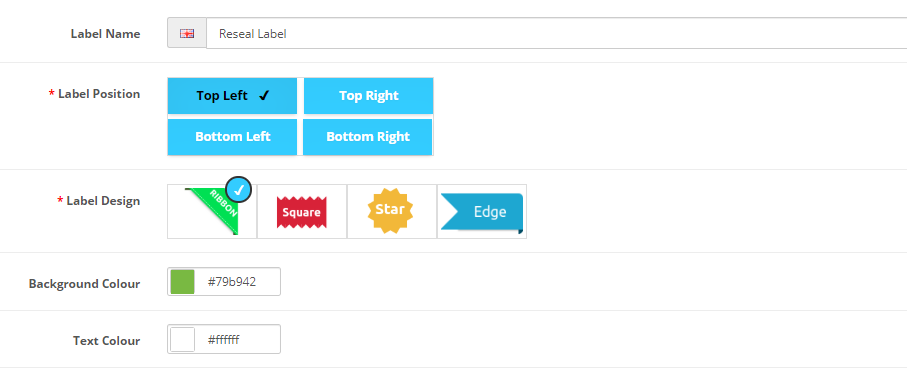
Position of label
- Top-Left.
- Top-Right.
- Bottom-Left.
- Bottom-Right.
Types of label designs.
- Ribbon.
- Square.
- Star.
- Edge.
Useful settings.
- Label customization.
- Show a specific customer group.
- min-max Stock checking.
- All products of a category(ies).
- Products only.
- Multi-Language.
There are many in-built features present in this extension, Use these settings to show effective product labels to generate a healthy amount of revenue.
Design Your Label To Show On Products Images.
OpenCart Product label extension has an awesome setting that can use to create labels for products. It supports multi-language writing legible text in your language.
Animation is important for new and best-selling products. It grabs customers' attention easily. It facilitates the admin to set an animation to a label. Also, enter the time for animation. These animation settings will use to animate labels on product images.
Select multiple products or categories at the same time. The created label will show on both selected products and selected category(ies) products.
Admin has the option to show the label for no days. Define the number of days in the setting and the label will automatically remove when the number of days passed. It is best for prime deals that are held for a few days.
- Text Color.
- Label background color.
- Animation time, type.
- The number of days to show.
- Supports category(ies) only.
- Products only.
- Manufacture
- A combination of the three will also work.
Multi-Store, Customer Group Also Supports
There is a more important setting present. It is an advanced setting also, affects store wise. It will help the admin to show labels on products in required stores, not all. It is really useful when websites run multi-store and have the same products selling at multiple stores.
It supports the customer group. Admin has the option to use the customer group in the setting for showing or hiding labels on products when a customer is login into your website.
- Customer group:
Multi-Store uses to show products for sale. TMD module is designed to support a multi-store website. This means the admin can select specific stores to display product labels.
- Multi-Store:
Admin can select multi-store where products will display with labels on their image. This option is created to save admin time. The module will automatically handle the internal part and whenever multi-store access, the customer will see the label. So admin can give more focus on the sale.

Inform Customer About Stock Quantity Of Products
Let your customers know about product quantity. Quantity is low or soon the product will go out. It pumps people's sentiments and they will get attracted. It increases the sales percentage.
The module lets you define the minimum and maximum quantity that must have to show the product label. Once a label is reached product label will show and after that when product quantity is going out of the range defined in the setting. OpenCart product label extension
By using this module, OpenCart let you add product labels easily, and the admin can remove labels from the product just simply remove the product from setting
- Defined min and max product quantity.
- Show and hide the label automatically.
Default Modules And Pages Supported By OpenCart Product Label Module
This extension is created on top of the default OpenCart modules. It supports most of the built-in modules that ship with OpenCart itself. It is one of the most important features of the product label extension.
Admin does not need to worry about a product being shown by default modules on website pages. Admin just needs to select the products from the label set. And the selected product to show the label will display on other modules too.
It supports the OpenCart website with many pages where listed products will have labels on product images. They are listed below.
Some supported modules
- Bestseller
- Featured
- Latest
- Special
Supported pages list
- Product
- Category
- Search
- Manufacturer
- Special
Multi-Language Compatible
TMD cares about its customers and clients. That's why we create all modules and themes multi-language compatible. Your website uses non-English language.
If your website supports multi-language then the product label for OpenCart will let you enter the label text in multi-language. When the customer change language on the front end, the module also shows the selected language label text entered by the admin. It works seamlessly with multi-languages.
Supports OpenCart 2.x and 3.x versions
TMD specially made this module work on OpenCart versions 2.x and 3.x versions. A module can be easily installed via the upload module section in admin, on your website because this module uses OCMOD. Which does not overwrite OpenCart core files. OpenCart product label module also works with the cloud online.
Your website remains untouched. All your work will work after the installation TMD module.
Our all modules, extension, and themes are plug-and-play. Just install and you are ready to use them right away.
Support
Got pre-sale questions or have questions about support. Please create a ticket. We will help you to get it working.
Tags:
Full Documentation
Compatiabilty
| Supported OC Versions | 2.3.0.2 , 2.3.0.1 , 2.3.0.0 3.0.3.8 , 3.0.3.7 , 3.0.3.6 , 3.0.3.2 , 3.0.3.1 , 3.0.3.0 , 3.0.2.0 , 3.0.1.2 , 3.0.1.1 , 3.0.0.0 2.1.0.2 , 2.1.0.1 , 2.0.3.1 , 2.0.2.0 , 2.0.1.1 , 2.0.1.0 4.0.2.3 , 4.0.2.2 , 4.0.2.1 , 4.0.2.0 , 4.0.1.1 , 4.0.1.0 , 4.0.0.0 , 4.1.0.0 , 4.1.0.1 , 4.1.0.2 , 4.1.0.3 3.0.3.9 , 3.0.4.0 |
| VQMOD Required | No |
| MultiStore Support | No |
| Support | yes |
| Update | yes |
Related Products
Bestseller
Bestseller
Product Options
Product Option Size & Color Combination Pro
.tab-description-new..
2.x.x,3.x.x
$29.99
$28.49
Third-Party Connectors & Integrations
WhatsApp Chat Tool
.tab-description-new..
(1)
2.x.x,3.x.x
$29.99
$28.49
Product Page & Merchandising
Public Download For Product
.tab-description-new..
2.3.x ,3.x.x.
$29.00
$27.55

Specialised Selling Models
Order With Prescription or Attachment
TMD is an Offical Pa..
$39.00
$37.05
Cart, Checkout & Order Management
Availability Time Slots
.tab-description-new..
(1)
3.0.0.0, 3.0.1.1, 3.0.1.2, 3.0.2.0, 4.0.0.0_b, 3.0.3.0, 3.0.3.1, 3.0.3.2, 3.0.3.3, 3.0.3.5, 3.0.3.6
$20.00
$19.00
Product Page & Merchandising
Arrival Date
.tab-description-new..
2.x.2.2.x,2.3.x,3.x.x
$39.00
$37.05