


License details
Commercial
Product Option Model
- $20.00 $19.00
Demo Videos
See the extension in action before you buy — the live storefront, the admin panel and the complete video walkthrough.
Live Storefront Demo
Browse a real OpenCart store running this extension.
Admin Panel Demo
Explore the extension settings from the admin panel.
TMD is an Offical Partner of OpenCart
View Profile: TMD OpenCart Extensions India
Overview of TMD OpenCart Product Option Model
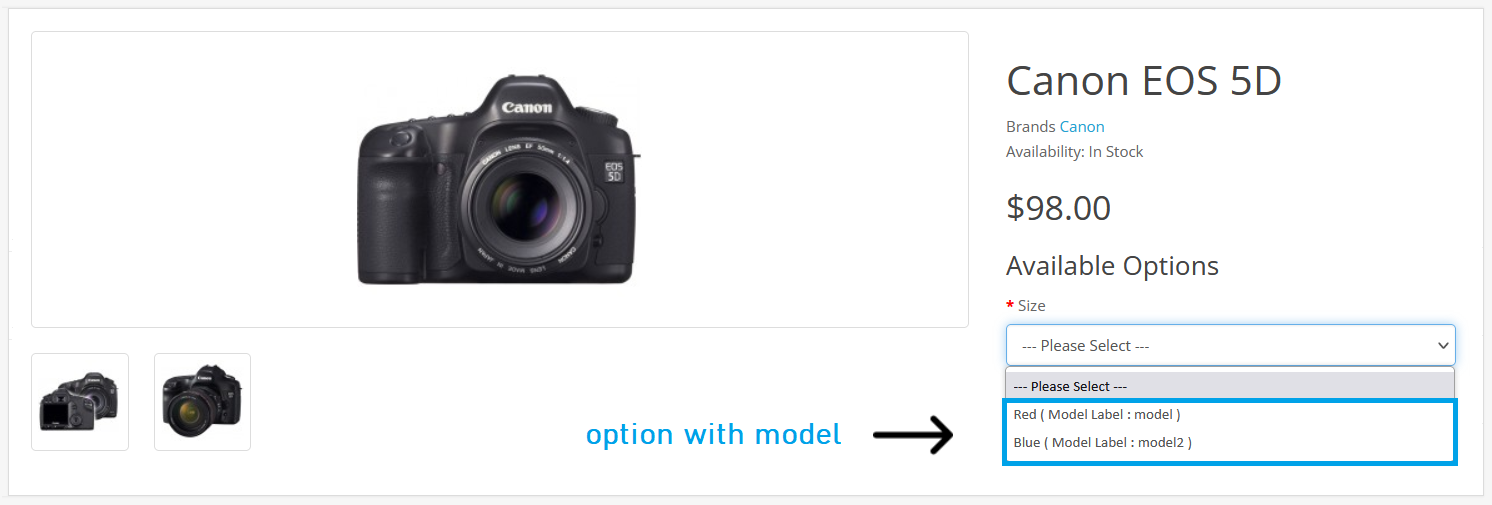
This extension is designed exclusively for those ecommerce websites having products with multiple variants or options. It will let the business owner show the model name of each option of the item. The model name will display just after the option on the product page.
Reading the model name of the product option makes the customer aware throughout the order process and can verify the product when it arrived at their location. Also, The stock management of the products will be easy. Thus, this module will help both customers and businesses.
Supported Options Are
This option model module supports various types of options, ensuring that it aligns perfectly with your specific needs. Select, checkbox, and radio buttons are the most common and used option types in ecommerce websites. These options are supported by this extension in the OpenCart website.
- 1. Select (Drop-Down)
- 2. Checkbox
- 3. Radio Buttons
Adding Model Name To Product Options In OpenCart
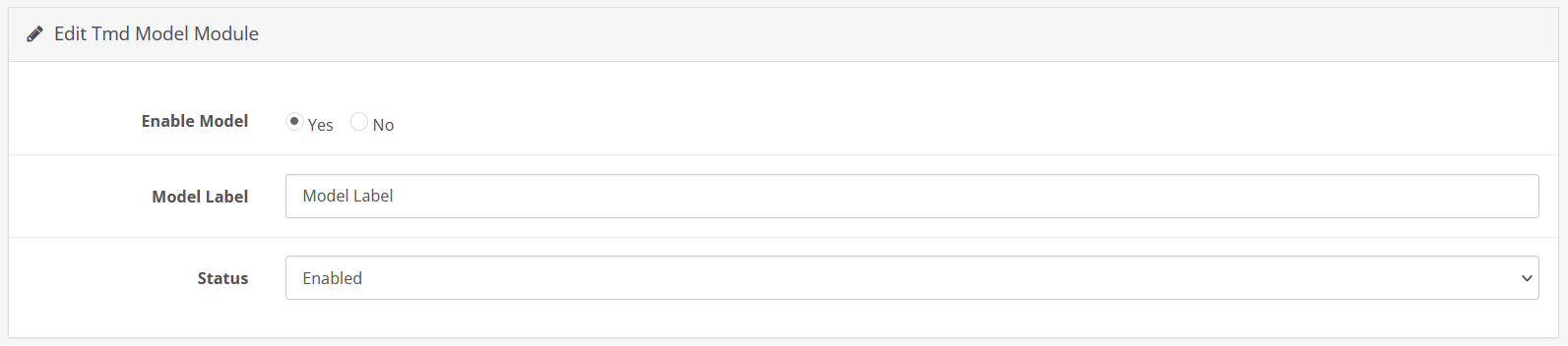
It is fairly easy to add the model name in the product options using this module. There are only two steps involved. First, go to the setting of the option module extension. select the status enable and write the identifier. For example "MODEL". It will appear before the model name of the product option.
Now, Go to the product list → edit the product → select the options tab → search the option type from these three select, radio, checkbox. Write the model name in the options section. Hit the save button. Follow the same process for other products.

Checking Option Model on Product Page
Navigate to the product page. Check the options list. Individual option names are appended with the model name in the round brackets. There will be no changes in the design while appending the model name with an identifier in the options.
The model name has the same text color as the option as the module uses the website color theme to maintain the branding. It displays perfectly across all devices, whether it’s a desktop, tab or mobile.
Working With Most OpenCart Themes
The unit test has been performed with multiple themes to ensure you will get the working extension on your website. Here are some names of themes in which the module is tested Journal, Shoppica, Poco, Sellegance, Fastor, Pavilion, BigShop, eMarket, etc.
This extension will automatically insert the model name into the product's options no matter what OpenCart theme you are using.
Compatible With Multiple OpenCart Versions
TMD made the OpenCart option model name module compatible with multiple versions of the OpenCart. You will always find it compatible with the latest version of OpenCart. Our extension is compatible with 2x, 3x, and 4x versions.
You can follow the official installation process to install this extension on your website.
Effortless Installation
The installation of this module is easy and similar to other OpenCart extensions. Go with the extension installer or upload the module files on the server manually. Follow the easiest method for you. Your website files remain untouched while and after the installation of the extension.
Follow the online documentation for installation and setting. You will find the documentation link in the document tab or just ask the support team they will do it for you.
Support
Tags:
Compatiabilty
| Supported OC Versions | 3.0.3.8 , 3.0.3.7 , 3.0.3.6 , 3.0.3.2 , 3.0.2.1 (Beta) , 3.0.2.0 4.0.2.3 , 4.0.2.2 , 4.0.2.1 , 4.0.2.0 , 4.0.1.1 , 4.0.1.0 , 4.1.0.0 , 4.1.0.1 , 4.1.0.2 , 4.1.0.3 2.2.0.0 2.1.0.2 , 2.1.0.1 , 2.0.3.1 , 2.0.2.0 , 2.0.1.1 , 2.0.1.0 2.3.0.2 , 2.3.0.1 , 2.3.0.0 |
| VQMOD Required | No |
| MultiStore Support | No |
| Support | Yes |
| Update | Yes |