TMD is an Official Partner of OpenCart
View Profile: TMD OpenCart Extensions India
Overview of TMD OpenCart Order Tracking Module
With this extension, streamline your customer's experience by enabling real-time order shipment tracking right from their account order list page. It enables the admin to configure multiple courier service companies using their API. This gives freedom to businesses to integrate multiple shipping companies and ship the item with the courier company which is the most reliable and takes fewer charges.
Let your customer track orders with and without login into their account. Both features are available in this module.
Nearly 90% of online shoppers identify easy order tracking as the key to their satisfaction. Elevate customer trust by making the order-tracking process transparent and simple.
It works with the latest version of OpenCart, supports most themes and is compatible with multi-language.
Manage The courier shipment companies
This extension uses the API of the shipment companies for the configuration. It means you can integrate any courier shipping service into your website. Businesses can add multiple shipping companies to ensure order fulfilment is going smoothly.
You just enter the names of the shipping companies and their respective tracking URLs directly from the module settings. Add the tracking shortcode to make the API fetch the given order shipment details.
Admins have full control over enabling or disabling this order-tracking feature.
- ✔ Enter the shipping company name.
- ✔ API to track.
- ✔ Use the tracking number shortcode in the API

Assigning the Shipment Tracking Code to the Order
In the admin panel, a new segment titled "Order Tracking" will appear on the order details page in the admin panel.
Edit the order you want to be assigned and scroll down to the "Order Tracking" section. Here, choose the shipping company from the dropdown menu and input the tracking code you've obtained. Click the 'Update' button to link the code to the order. Feel free to modify the tracking code as necessary at any time.
The shipment order tracking number will display to both the admin panel and the customer account right after it's assigned by the admin. Even the admin can send a notification that the order is ready to ship.

Display The Order tracking Number With Order Information
Admin
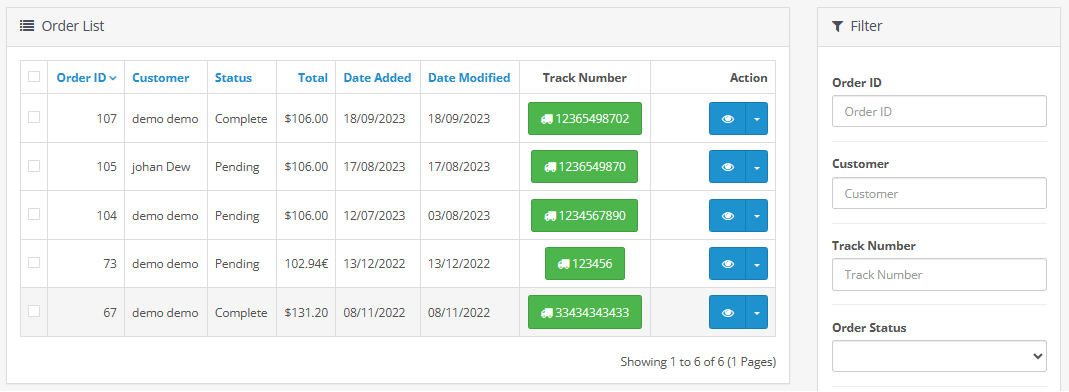
For the convenience of the admin, this OpenCart order tracking module adds the tracking code to the order list and order detail page. In the order list, there is a new column added called tracking code. And in the options section, the tracking code is added to the order detail page.
Admin can navigate to the shipping website order tracking information page after clicking on the tracking code. Extension will append the order ID and tracking code in the url so that you will get access to the order tracking details.
in the order filter section, the tracking code field is added automatically. Admin can filter the orders using the tracking code.
- ✔ Order list and detail page.
- ✔ Filter Order By tracking code.
Customer
The module automatically creates a new section to display the shipment tracking number along with the tracking URL in the order list and detail page.
Customers can view the tracking number, and by clicking on it they will be redirected to the shipping company website to see the item shipment status and location.
- ✔ order list and detail page.
- ✔ tracking code display and url.

Order tracking within the Website
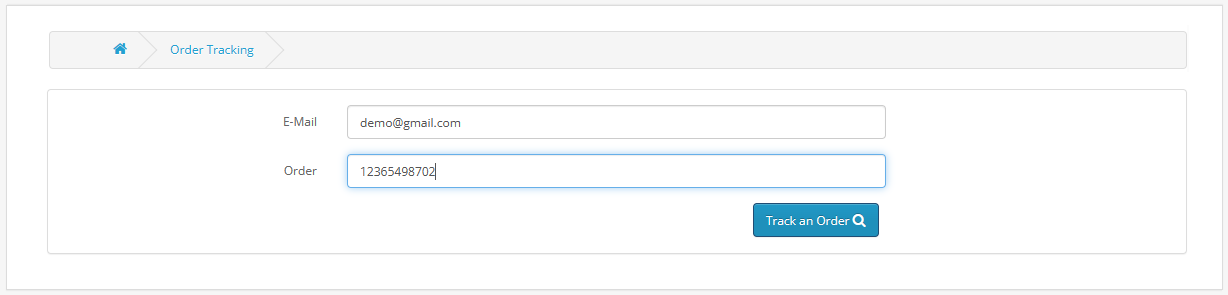
Customers can conveniently monitor their order status without needing to log into their accounts, providing flexibility to track the shipment from any device. It also adds the trust toward website.
The customers need to simply enter their email ID and order tracking code and AJAX technology will get the real-time shipment details of that order.
Information about the item's shipping status and current location will appear on the same page, without requiring a refresh.
- ✔ Email, and tracking number.
- ✔ The shipment tracking will show.
- ✔ Estimated time for delivery.
Working With Multi-language
The OpenCart order tracking extension offers multilingual support to cater to a diverse customer base. It will automatically detect all the enabled languages on the website.
In the setting, language tabs having the country flag will be created. Admin can write the text in all the languages. Customer will see the order tracking text in their selected language.
It will help you expand your business and target international customers. Multi-language will contribute to a more inclusive and streamlined shopping experience.

Compatible With Most of OpenCart Themes
This module is designed for maximum compatibility, seamlessly integrating with a majority of OpenCart themes available in the marketplace. It is well-tested with multiple themes to ensure you get the working module.
Sellya, Shoppica, Faster, Journal, Sellegance, e-Market, Bigshop, and SimpleGreat are the names of a few OpenCart themes on which we have done the testing.
New fields in the order list page and detail page will be automatically added in the customer account section. The module uses the theme's CSS and styling to maintain the branding.
Compatible With Multiple OpenCart Versions
TMD made all the mdoules and theme compatible the the OpenCart 2x and 3x OpenCart versions. It uses the OCMOD for the installation. Your website files remain untouched and safe.
Also, you can use this module without any worry about your website upgradation or migrate to a newer version of OpenCart. You will always find this extension compatible with your website.
Q&A
Q: Does the module support multiple languages?
A: Absolutely, the module is designed to support multiple languages for a global reach.
Q: Which shipping company does this module support?
A: All the shipping companies are supported by this extension, All you need is API access to get the shipping tracking enabled on your website.
Q: How do customer can track the order shipment status?
A: The order tracking opencart extension comes with two kinds of tracking options. Order shipment information can be shown within the website or the customer can go to the respective shipping company's site by clicking on the tracking code to know the current status of the order.
Support
If you want to do any kind of customisation on your website or looking for help in the installation of setup. Please create a ticket. Our team member will get back to you as soon as possible.