
Modules / Extensions
OpenCart XLS Export (1.5.x ,2.x & 3.x,4.x)
.tab-description-new..
See the extension in action before you buy — the live storefront, the admin panel and the complete video walkthrough.
Explore the extension settings from the admin panel.
View Profile: TMD OpenCart Extensions India
It helps admin OpenCart to import affiliates, customers, coupons, and users at once. It also gives the option to export this information into an Excel file. There is the only module in the market that will give all-in-one import and export and disapprove into the OpenCart website.
TMD OpenCart module lets you also disapprove or disable the coupons and affiliates' profiles. The main advantage of this module is it gives you an Excel file template where the admin can make changes to files and import them into the website.
OpenCart lets you create coupons and give a discount to the customer. These coupons will be used by customers while shopping. This is time time-consuming process to create many coupons.
To reduce the process of creating and disabling existing coupons. This module lets you import and export the coupon to the website. Importing coupons will create new coupons into the website if not present and update existing ones.
TMD OpenCart Customer import and export module gives the admin a new way to manage customers. Export all customers into the local device and save the sales report. Customer export file also helps you make some specific customers disapprove or approve.
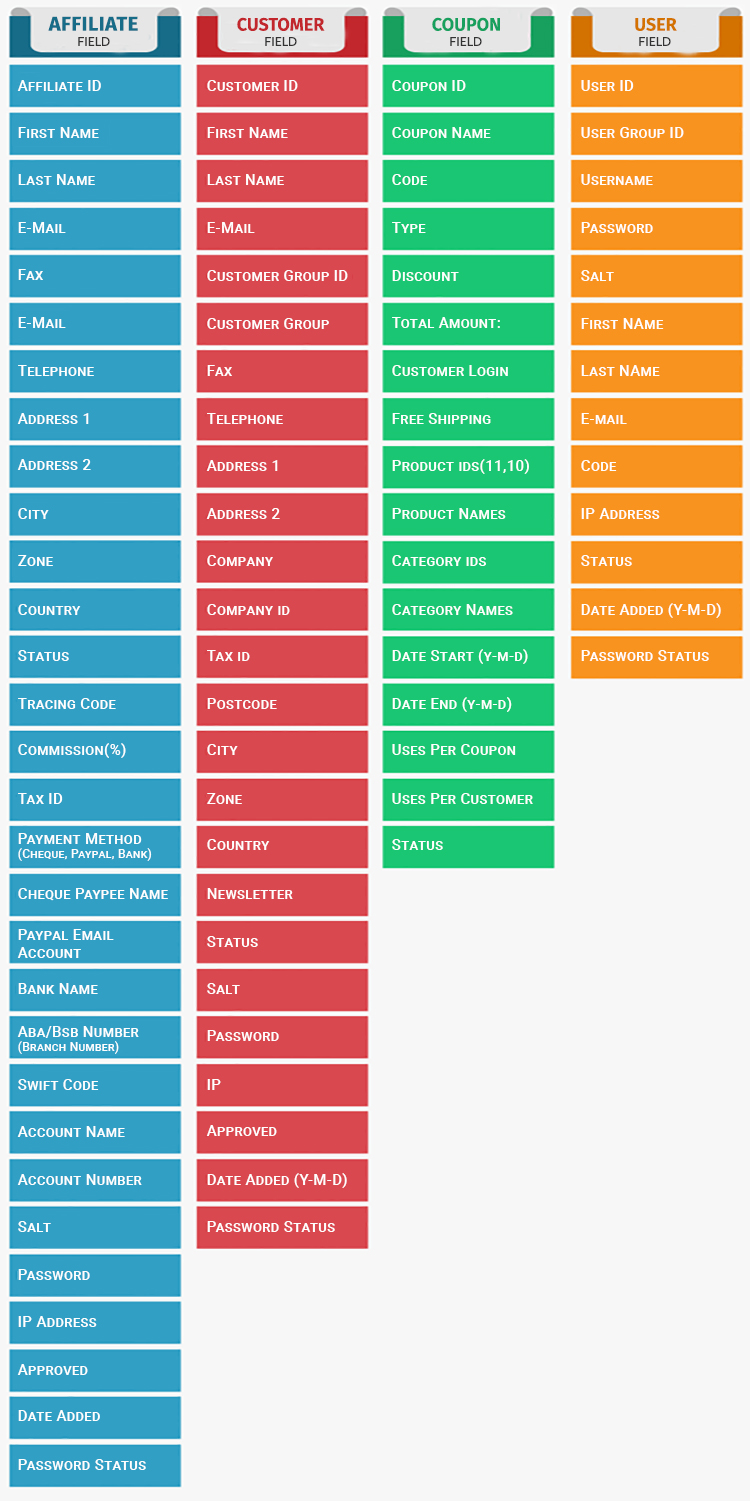
After that admin can import that file into the website. All the existing customers will update automatically. Here fields will be exported and imported into the file

OpenCart all in one import and export and disapprove Module let download affiliate account. It makes admin work easy because tracking Affiliate accounts is easy using Excel files.
If you have any kind of questions, or suggestions, or looking for support. Please create a ticket.
how to use 1.5x
1. Extract all the files into your root folder.
2. Provide access and Modify permissions for the module in System > Users > User Groups.
3. The module can be used through All Import/export > Import, Export
how to use 2.x
1. Go to Administration Panel
2. Go to Extension Installer option in the menu
3. Upload All .ocmod files.
4 Go to Modifications menu
5. refresh the page from the refresh button that preset on top
6. Give Permission for user group
7. The module can be used through All Import/export > Import, Export
Support
If you have any kind of question, suggestion or looking for support. Please create a ticket.
| Supported OC Versions | 1.5.6.4 , 1.5.6.3 , 1.5.6.2 , 1.5.6.1 , 1.5.6 , 1.5.5.1 , 1.5.5 , 1.5.4.1 , 1.5.4 2.2.0.0 , 2.1.0.2 , 2.1.0.1 , 2.0.3.1 , 2.0.2.0 , 2.0.1.1 , 2.0.1.0 , 2.0.0.0 |
| VQMOD Required | No |
| MultiStore Support | No |
| Support | yes |
| Update | yes |