This module helps the website to show spare parts detail on the product page. Website selling spare parts often need to display and give the filter of spare parts specifications so as to display the best product to customer's requirements.
Spare parts information shows on the selected product page. Engine, models, make, and manufactured dates are easy to save. Showing on the product page is done using selected these things you created.
Things You Can Do With Year Make Model Extension
It gives a lot of options from creating Engines and model names and years to attach with the product. Also, there is an option to make filters. This is one of the coolest features you will find.
This module has the option to add all this information in pairs to the product. Here are the listed features the module has bundled with.
Create Unlimited Engines
Model Creation
Advance Filter For Search the Product.
Import-export option (new).
Display On product Page (new).
Support Multi-Language
Display all kinds of parts Manufactured on the date
Create Unlimited Engines using OpenCart Year Make Model Module
Admin can create as many engine names and enter manufactured dates. The creation process is too easy, All admin put the name of the engine and hit enter. The created engine will display in the list. Admin can also delete them from the engine page.
These engines will be used to show on the product page along with other information. In the filter section, customers can filter using the engine name.
Create an engine name
Edit and delete are easy.
Use to show on the filter.
Creation Of Model Creation In Admin
Model creation is also easy and like you creating an engine. This extension lets you enter the name of the model and pressing enter will create the model
All the models are listed on the model page, admin can edit the model by clicking on the pencil icon. It will bring you an edit section of the name. Enter the new or correct name of the model. And hit enter.
Create unlimited models.
Select these models on the product page.
Show on Filter Section.
Admin Selecting Model, Year, And Make On A Product Page
Adding spare parts information to the product page is quite simple. It inherits the default OpenCart layout for existing and new website owners.
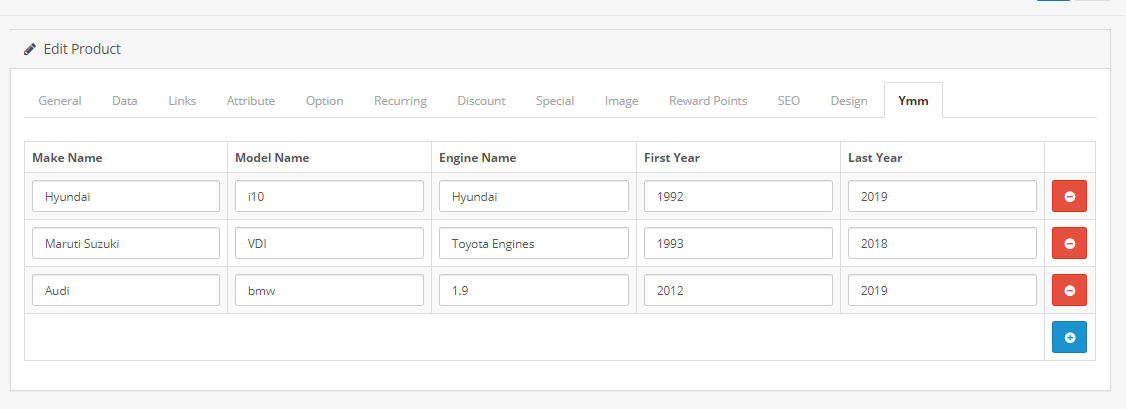
Admin can add multiple sets of spare parts information. It consists of engine name, model name, makes, Year of manufacture, and end year. All this information is entered in pairs so that the filter can scan it and get the right product to search result.
Customers Can Use Advance Filter For Search the Product
An advanced filter is generated automatically by this module. Search filter information is taken from the admin. Data present in Engine, Model, and Make will be used to create an Advance Filter.
Whenever customer search for a product, modules gives the best search result by checking the product details,
Another feature is, that the filter can be placed on any page. Because it is present under the layout section. From Layout generation, Admin can select the area and page to display the filter.
Multi-Language Compatible.
TMD cares about their customer and client. That's why we create all modules and themes multi-language compatible. Your website uses non-English language.
Admin can write engine's names, and models, and make a name in more than one language that their website uses. However, templates give you the option to enter text in all languages which are currently installed on your website.
OpenCart YMM extension will auto-detect the language of visitors and show filter data like spare parts information in that language.
Supports OpenCart 2.x and 3.x versions
TMD specially made this module work on OpenCart versions 2.x and 3.x versions. A module can be easily installed via the upload module section in admin, on your website. Because this module uses OCMOD. Which does not overwrite OpenCart core files.
Your website remains untouched. All your work will work after the installation TMD module.
OpenCart YMM extension is plug and play. Just install and you are ready to use it right away.
Support
Got pre-sale questions or have questions about support? Please create a ticket. We will help you to get it working.