


License details
Commercial
2.x Compatiabilty
42585
Product Option Image Pro
(11 reviews)
- $20.00 $19.00
Sold by an Official OpenCart Gold Partner
Free updates for 6 months, valid for one license only
Secure checkout, instant delivery
Facing an issue?
Raise a ticket
Demo Videos
See the extension in action before you buy — the live storefront, the admin panel and the complete video walkthrough.
Live Storefront Demo
Browse a real OpenCart store running this extension.
Admin Panel Demo
Explore the extension settings from the admin panel.
TMD is an Offical Partner of OpenCart
View Profile: TMD OpenCart Extensions India
Overview of TMD OpenCart Product Option Image Pro
This extension lets the OpenCart website display option images on product pages for a dynamic user experience. Customers get a clear idea of how their product will look after seeing the selected option image. Enhanced visibility of products helps boost sales rate on your website. With unique product variants and visibility, the extension increases customer retention, enhances product display and conversion rate.
This option image module is compatible with the multi-language, multi-store, and latest stable version of OpenCart and works with most themes.
If you are looking for multiple option images then you must look into the OpenCart option sub images module
Adding images to Product Options
This OpenCart variant image extension creates a new field tab called Image in the existing option tab of the product. It takes only three steps to add the image for the product option in OpenCart.
Go to Admin → Edit the product → Navigate to the options tab > In the options list you will see the Image field. Select the image for that option. Hit the save Button. Follow the same process to change the option image.
You can show the image for Select, radio, checkbox, color options only. These options are widely accepted by the OpenCart themes and customers are familiar with these options.

Showing Images on Product Option Selection
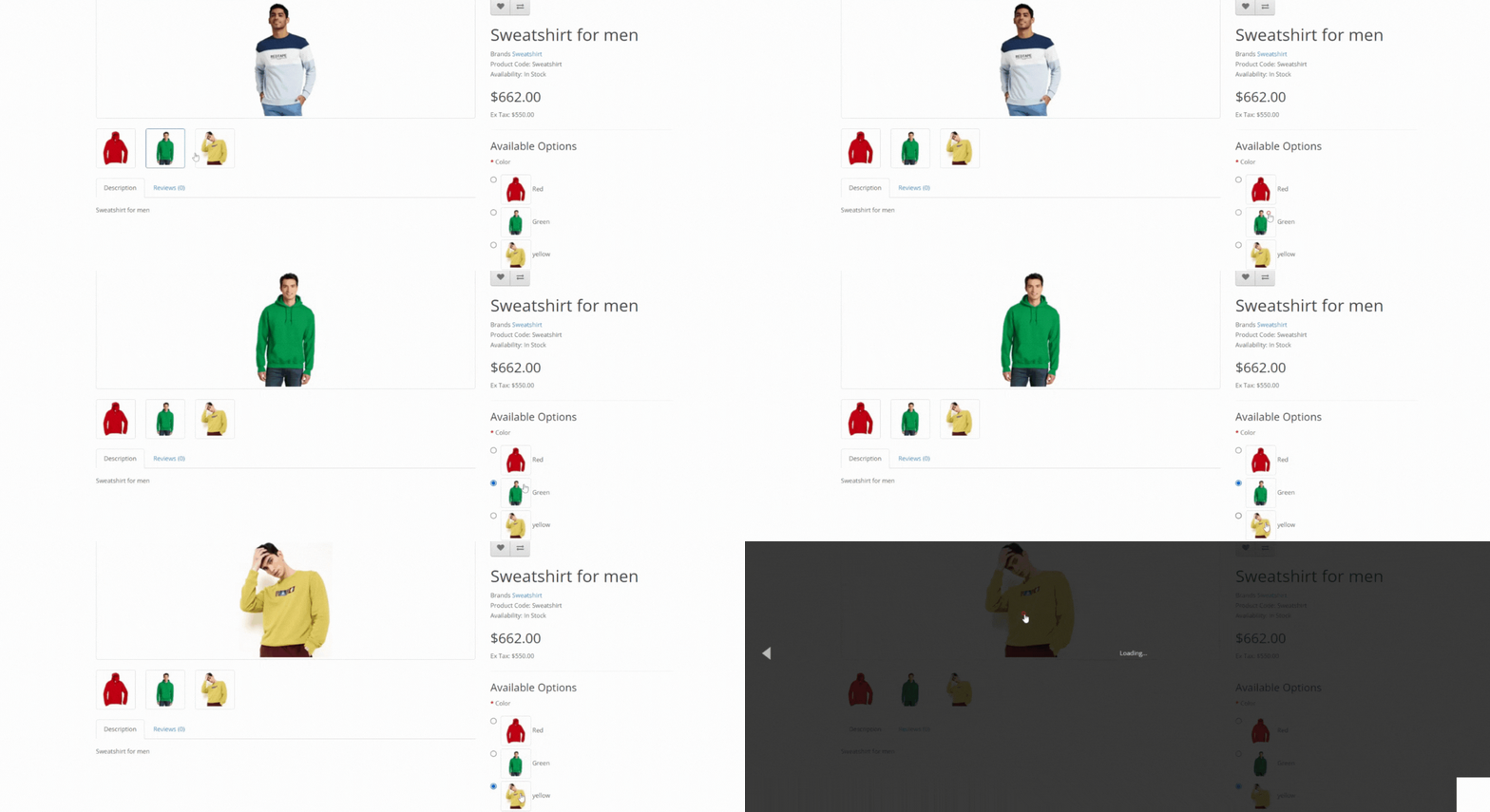
This OpenCart product option image module creates thumbnails of product options automatically. Thumbnail images were added on the right side of the option text on the product page. When the customer selects the option, the big image will update to the selected option image.
The image transition is very smooth. It enhances the visibility of options and improves understanding for your customers. It adds the value to the customer for the product page. This extension uses XML to show the option images on the product page.
Working On Most OpenCart Themes
Because of its dynamic loading feature, all the functionalities of this product option image extension are added to the website at the time of loading in the browser. This extension has tested most of the OpenCart themes available in the market. Some name themes are Sellya, Shoppica, Faster, Journal, Sellegance, e-Market, Bigshop, and SimpleGreat.
You can easily use this extension on the Journal theme versions 2 and 3.
Works With Multi-Store
You can sell the products in multiple stores. The OpenCart option image module is working with the multi-store feature. It does not matter if the product is showing on the primary store or multi-stores, option images will always be shown on the product page.
Compatible with multiple Version of OpenCart
The module is created Plug and Play feature. It efficiently works on OpenCart versions 2x, 3x. It is also available for the latest version of OpenCart 4x. It provides you with seamless integration, flexibility and ease of use when you move to a newer version of OpenCart.
This extension works with the cloud version of OpenCart. It makes the product option image upload process regardless of versions of OpenCart.
Easy Installation
This OpenCart option image extension can be installed using two methods. OCMOD Use: By utilizing OCMOD, this extension ensures no overwrite on core files. The module ensures that your website remains untouched post-installation.
First, Go to the Admin panel of your website. Navigate to the Extension Installer page. Upload the ZIP file of the module that you downloaded from our website. It will take a few seconds to install the module. You will get a success message.
Second method. Unzip the file module file. Connect your website server via SFTP connection using Software like FileZilla or CuteFTP or open the website via cPanel or Plesk. modules following the structure of module files. Upload the files on the server.
Now navigate to the Extension list page of your website admin panel. Find the TMD OPTION IMAGE module. Click the [+] activate button. The module is ready to work on your website.
Use Case:
Imagine an online clothing ecommerce website using OpenCart. The store offers t-shirts in multiple colors — red, blue, green, black and yellow. With the Product Option Image module installed, you can assign an image to each color option such as Blue, Red, Green, Yellow, or Black. When a customer visits that t-shirt page and selects “Blue,” the main product image updates instantly to show the blue colored t-shirt.
This makes it easy for customers to see exactly what they’re choosing before they buy, which cuts down on confusion. The instant switch from the main image to the selected option image improves the user experience and often increases conversion rates, especially for stores with customizable or multiple product options.
FAQs:
Q: How do I add images to product options in OpenCart with this module?
A: With the OpenCart variant images module, the admin can easily assign unique images to each product option (like color, size, or material) directly from your OpenCart admin panel. Simply edit your product, navigate to the Options tab, and upload an image for each option value.
Q: Is the Product Option Image module compatible with Journal and other popular OpenCart themes?
A: Yes, this module is compatible with Journal and most standard OpenCart themes. If you experience any issues raise the ticket. Our support team will help to get it working.
Q: Will this module slow down my website or affect loading performance?
A: Not at all. The TMD Product Option Image module is built to be lightweight and efficient. It uses optimized code and smart image handling, so your product pages will load just as quickly as before—there’s no impact on your store’s performance.
Q: Can I show different images for each product variant or option on the storefront?
A: Absolutely! When customers select different product options (like color or pattern), the main product image will update in real-time to display the corresponding option image.
Q: Will I be able to add multiple option images?
A: No, currently this, module supports only image for option, which is sufficient for most websites. If you have a requirement to have multiple images displayed like selecting a red color option that will replace all existing images with red colored variant images then you must look at our Option SUb Image Module
Support
If you are looking for support for a theme or module or want to do any kind of customization on your website. Please create a ticket. We will be happy to assist you.
Tags:
- product option image
- option image
- option image product
- related option image
- product related option image
- image related
- option related
- image related option
- option images
- product option images
- option image fast
- quick option image
- option image re
- option image products
- products option image
- product fast option image
- product option images pro
- option image local
- option image admin
- option image admins
- option image admin product
- option image as per
- as per option image
- product option image pro
- option image pro
- product option pro
- pro option image a
- pro product option image
- option image fas
- option image gap
- product option image gap
- product option image fasts
- product option image quick
- quick product option image
- option image product quick
- quickes product option image
- quikes product option image
- pro fast product option image
- product option image op
- oc product option image
- oc product option image
- tmd product option image
- product option image tmd
Full Documentation
Compatiabilty
| Supported OC Versions | 2.1.0.2 , 2.1.0.1 , 2.0.3.1 , 2.0.2.0 , 2.0.1.1 , 2.0.1.0 2.3.0.2 , 2.3.0.1 , 2.3.0.0 , 2.2.0.0 3.0.3.9 , 3.0.3.8 , 3.0.3.7 , 3.0.3.6 , 3.0.3.2 , 3.0.3.1 , 3.0.3.0 , 3.0.2.0 , 3.0.1.2 , 3.0.1.1 , 3.0.0.0 4.0.2.3 , 4.0.2.2 , 4.0.2.1 , 4.0.2.0 , 4.0.1.1 , 4.0.1.0 , 4.0.0.0 |
| VQMOD Required | No |
| MultiStore Support | No |
| Support | Yes |
| Update | Yes |
Related Products
Bestseller

Free Module
Product Custom Tab Multilanguage (2.x.x & 3.x.x,4.x.x)
SPECIAL FEATURE-----..
(1)
2.x
Free

Modules
ADDITIONAL PRODUCT INFO FIELDS(1.5.x , 2.x , 3.x & 4.x)
TMD is an Official P..
2.x
$20.00
$19.00









Modules
Product Option SKU
.tab-description-new..
(1)
3.0.2.0, 4.x.x.x,, 2.2.x, 2.x.x,2.3.x
$20.00
$19.00

Modules
Product Switcher Pro
.tab-description-new..
3.0.3.8 , 3.0.3.7 , 3.0.3.6 , 3.0.3.2 , 3.0.3.0 , 3.0.2.0 , 3.0.1.2 , 3.0.1.1 , 3.0.0.0 4.0.2.3 , 4.0.2.2 , 4.0.2.1 , 4.0.2.0 , 4.0.1.1 , 4.0.1.0 , 4.0.0.0
$59.99
$56.99