


License details
Commercial
2.x Compatiabilty
39359
News - Article Blog Module (1.5.x and 2.x,3.x,4.x)
(4 reviews)
- $20.00 $19.00
Sold by an Official OpenCart Gold Partner
Free updates for 6 months, valid for one license only
Secure checkout, instant delivery
Facing an issue?
Raise a ticket
Demo Videos
See the extension in action before you buy — the live storefront, the admin panel and the complete video walkthrough.
Live Storefront Demo
Browse a real OpenCart store running this extension.
Admin Panel Demo
Explore the extension settings from the admin panel.
TMD is an official partner of OpenCart
Our Profile: TMD OpenCart Partner
Overview Of OpenCart News - Article Blog Module (1.5.x and 2x)
The news module allows you to add news from the admin panel, it's a fully dynamic module the admin can customize as needed. From admin, you can add (a title, image, and description and you can set limitations for descriptions).
Admin can create categories for news and posts will link to these categories. It helps users to navigate easily and find news posts looking for. It is multi-language compatible. This extension is working with OpenCart's latest and older versions.

Creating News Posts Using OpenCart News Article Blog Extension
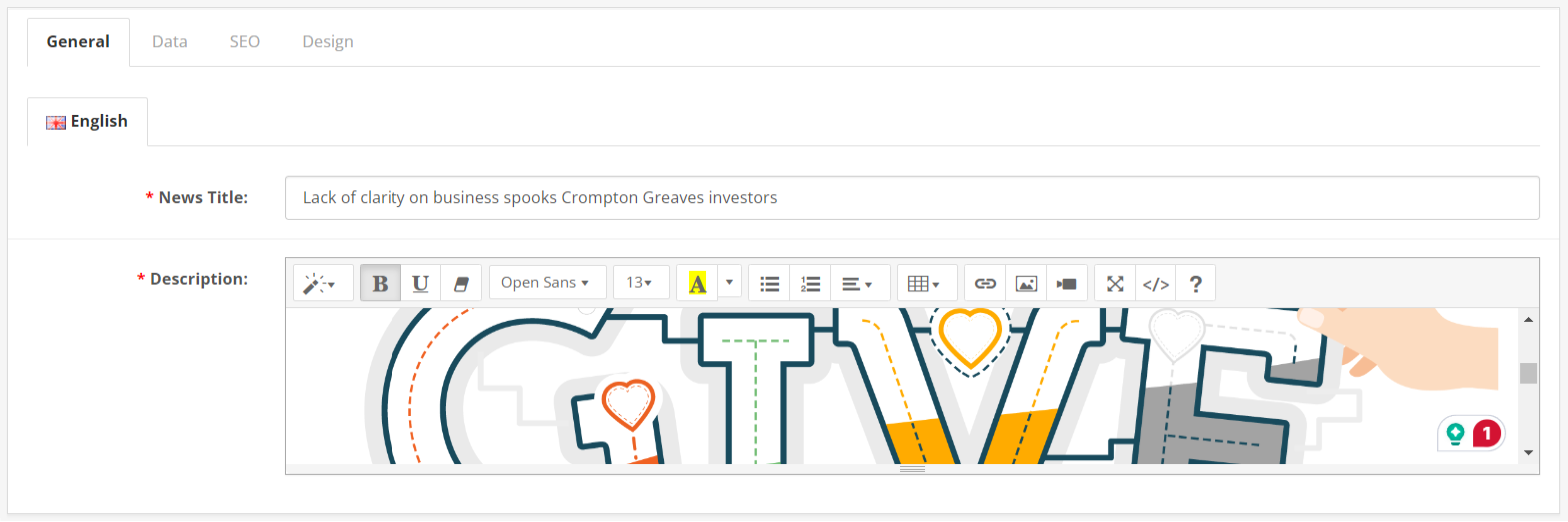
It has complete features for creating a news blog website on the OpenCart website. Admin can enter the title and description of news posts. The description has a WYSIWYG editor built. It makes writing in HTML and text-based posts by admin. With rich features to embed videos images and other HTML code.
Feature images can be attached to news articles and blog posts. This image is displayed on top of every post. To make post url search engine friendly this module comes with an SEO url. The post url will be created by a keyword entered by the admin. Moreover, posts can be linked to one or multiple stores. One news article will be displayed on every store that is linked.
There is a setting for overriding the pre-build layout for news posts by the admin by selecting one of the created layouts.
- Title
- Description
- SEO url
- Image
- Stores
- Sort Order
- Design override
- Status
Adding Categories For News Article Posts
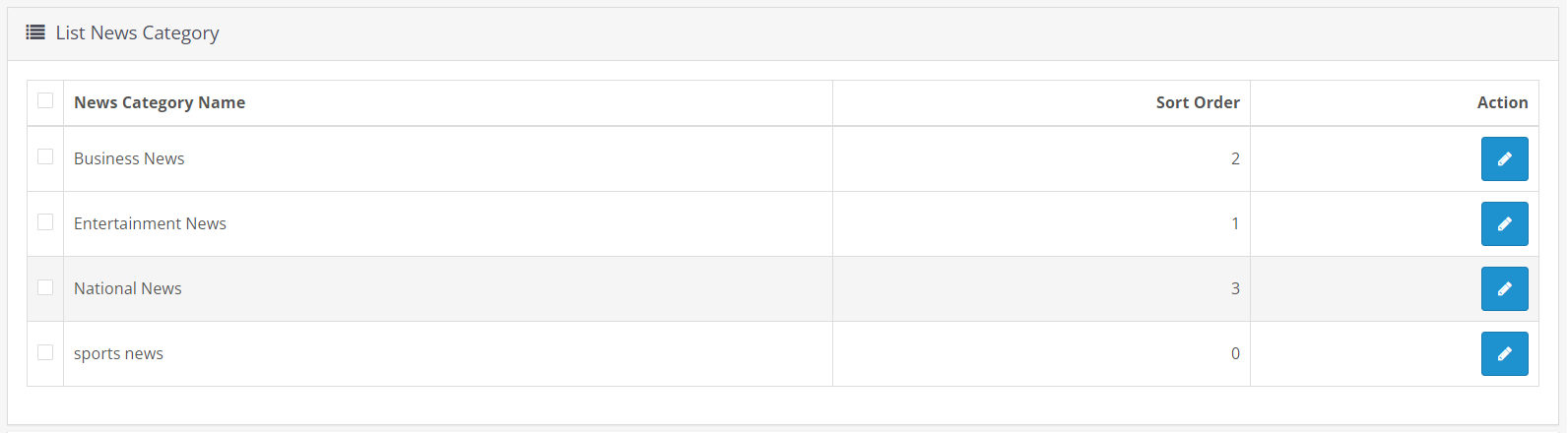
The category is an important part of any news article website. Admin can create unlimited categories that will be used to link to posts. It has features that give name, description, links to the parent category, sort order, SEO-friendly url, category image, and more.
Categories can easily show and hide on the news blog section, just by changing the status of the setting. There is a setting called sort order that lets the admin decide the category that will display before or after other categories. Like news posts, the category has a similar setting for linking with stores. If the website has multiple stores, then the news category will display on the linked store only.
Admin can change the design of the category page that displays the linked posts list. Create a new layout in the page layout setting, and apply that new page design to the category. It will override the existing design of the category that comes with the module.
Working Great With Multi-Language
TMD cares about its customers and clients. That's why we create all modules and themes multi-language compatible. If your website uses a non-English language still it will work and let you enter the news and categories in all installed languages.
All the currently installed languages on the website will be shown inside the news post as tabs. Admin can enter the information separately for all languages. This way, customers will be able to read the post in their selected languages on the site.
If your websites have multi-language and people use them. It works seamlessly with multi-languages.
Perfectly Work With All Themes
The module is tested with many famous themes. Journal, Shoppica, Fastor, Sellya are some names of the themes. News posts and categories look like part of the website. It takes website text and color themes to display the news posts. The module is working perfectly.
If you are using a custom theme made specifically for your website. Still, our module will work.
Supports OpenCart 2.x and 3.x versions
OpenCart news article blog module is created for and tested on OpenCart versions 1.5x, 2x, and 3x. It is tested up to the latest version 3.0.3.3. Also works great with the cloud version.
The module uses OCMOD. This means there are no core file changes or replacements. All the changes will apply on runtime using xml. Installation is too easy. Just need to upload a zip file. Follow the modifications refresh. You are done.

Features
- - Secure and simple installation So no need to change any Core files.
- - an easy way to install.
- - Free Support.
- - Multi-Languages
- - Fully SEO URLs
- - Fast Loading and Sleek
- - Multiple Tasks (news, blog, article)
- - Make your site More Beautiful.
- - Carousel options if have multiple News
- - Fully Customize. All controllers are provided in the admin panel.
- - Provide a documentation file in which all Steps mention for installing the module
Support
Any questions or suggestions are most welcome. Please create a ticket if you are looking for support or have a question or suggestion.
Tags:
- news
- advance news
- news module
- module news
- news extension
- seo url in news
- seo news
- seo
- cms
- blog
- news category
- blog category
- category
- artical
- top news
- hot news
- simple news
- news manager
- tmd news
- blog news
- category artical
- blog module
- artical module
- latest news
- news categories
- news carousal
- carousal news
- top news module
- next previous news
FULL DOCUMENT YOU CAN FOUND HERE
Compatiabilty
| Supported OC Versions | 3.1.0.0alpha , 3.0.3.8 , 3.0.3.7 , 3.0.3.6 , 3.0.3.2 , 3.0.3.1 , 3.0.3.0 , 3.0.2.0 , 3.0.1.2 , 3.0.1.1 , 3.0.0.0 2.3.0.2 , 2.3.0.1 , 2.3.0.0 2.1.0.2 , 2.1.0.1 , 2.0.3.1 , 2.0.1.1 , 2.0.1.0 2.2.0.0 4.0.2.3 , 4.0.2.2 , 4.0.2.1 , 4.0.2.0 , 4.0.1.1 , 4.0.1.0 , 4.1.0.0 , 4.1.0.1 , 4.1.0.2 , 4.1.0.3 3.0.3.9 , 3.0.4.0 |
| VQMOD Required | YES |
| MultiStore Support | No |
| Support | yes |
| Update | yes |
Related Products
Bestseller


Modules
Multicolor Stock label (1.5.x , 2.x & 3.x ,4.x)
.tab-description-new..
(3)
2.x
$20.00
$19.00


Modules
ADDITIONAL PRODUCT INFO FIELDS(1.5.x , 2.x , 3.x & 4.x)
TMD is an Official P..
2.x
$20.00
$19.00


Modules
Availability Time Slots
.tab-description-new..
(1)
3.0.0.0, 3.0.1.1, 3.0.1.2, 3.0.2.0, 4.0.0.0_b, 3.0.3.0, 3.0.3.1, 3.0.3.2, 3.0.3.3, 3.0.3.5, 3.0.3.6
$20.00
$19.00


Modules
Product Option SKU
.tab-description-new..
(1)
3.0.2.0, 4.x.x.x,, 2.2.x, 2.x.x,2.3.x
$20.00
$19.00